The first Cardano testnet launched on May 28, and now here is your guide to getting up and started with the KEVM!
Get on KEVM Testnet
First, you need a *nix environment to work in. The easiest to get started with is Ubuntu.
Setting up Ubuntu is easy, but beyond the scope of this article. You can cheat by getting a server from DigitalOcean, AWS, Azure, Aliyun, etc and selecting Ubuntu 16.04.4 x64 as your OS.
Once your server is ready, install Java:
sudo add-apt-repository ppa:webupd8team/java
sudo apt-get update
sudo apt-get install oracle-java8-installer
We need to make sure we can actually use Java, so edit /etc/environment and add:
Create a new account with the command below, confirm your password 2 times and you will receive your address.
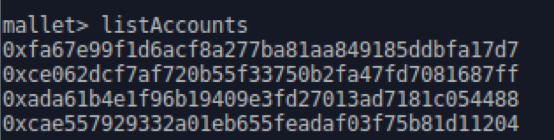
I have personally created multiple addresses so to view all these I type the command below ‘listAccounts’ . The most recently created address from the last slide is the last one listed.
To be able to interact with the wallet, you must first select which wallet you want to use by typing ‘selectAccount(address)’ this is shown below
Get tokens using the command below, or access the faucet website here Enter the address you want to use on the website and click ‘Request’
https://kevm-testnet.iohkdev.io:8099/faucet?address=<address generated by newAccount()>
Here I’m sending a transaction to my other address. It follows like this:sendTransaction(address, gasfee, gas amount, data value).
Enter the password you used for that specific address.
You’ll then see the transaction go through:
To confirm that it went to the wallet I sent it to, I selected the address I sent it to (it’s one of my own) and then used the command ‘getBalance’ . Here I can confirm that the tokens I sent have actually been received.
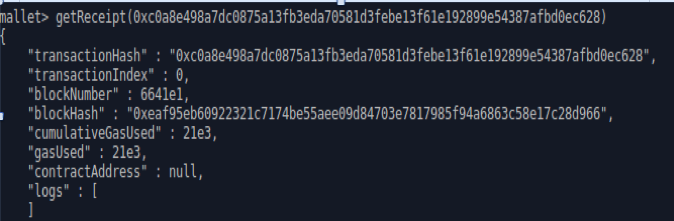
We can also check the transaction info from inside Mallet by typing getReceipt(txid):





Comments
Post a Comment